 SeaWork
Claude Code Remote Control: How It Works and How to Enable It (2026)
A practical guide to Claude Code Remote Control: what /rc does, how to enable it, what it can and can't do, and when to reach for a cross-provider alternative.
If you’ve started a long Claude Code run and then had to leave your desk, you already know the failure mode: the agent hits a permission prompt four minutes in and just waits, or it barrels ahead down a path you’d have stopped instantly if you’d been watching. Remote Control is Anthropic’s answer to exactly that — a way to keep an eye on, and steer, a running Claude Code session from your phone.
This is a practical guide to what Remote Control actually is, how to turn it on, what it does well, and where its edges are. If you’ve been searching for how /rc works or whether Claude Code has a mobile option, start here.
What Remote Control is
Remote Control lets you hand a live, local Claude Code session to your phone or browser. The key word is local: the agent keeps running on the machine where you started it. Your code isn’t copied to a cloud sandbox, and no hosted environment is spun up. Your phone becomes a window into the session that’s already running on your laptop — you watch it, message it, and respond when it needs a decision, but the work stays put.
That distinction matters, because “control it from your phone” could mean two very different things. It could mean the agent runs somewhere else and you’re just looking at it. Remote Control is the other kind: the agent stays on your machine, with your files, your credentials, and your environment, and only the control surface moves to your pocket.
How to enable it
For a normal interactive terminal session, there are two common ways to start Remote Control, and both take seconds. (Claude Code also supports enabling it in VS Code and configuring it to turn on automatically for every session — but the two below are the quickest way to try it.)
From inside a running Claude Code session, type the slash command:
/rcOr start Claude Code with Remote Control enabled from the outset:
claude --remote-control
# or the short form
claude --rc
Either way, Claude Code shows you a QR code and a link. Scan the QR code with your phone, or open the link — in the Claude mobile app or at claude.ai/code — and that same local session shows up on your phone. From there you can monitor it and send messages to steer it mid-run. With the Claude mobile app installed under the same account and notifications enabled, Claude Code can also push you a notification when it needs a decision.
What it’s good at
For the common case — one Claude Code session you want to babysit from away from your desk — Remote Control is genuinely good, and it does more than people assume.
- It steers, not just observes. You can send messages mid-run to course-correct when the agent drifts, not merely watch it scroll.
- It handles action-required prompts remotely. When Claude Code needs a decision — including permission prompts where supported — the request can reach your phone so you respond there, instead of the run freezing until you’re back at the keyboard.
- It can push notifications. With the mobile app installed under the same account and notifications turned on, Claude Code can ping you when it’s waiting on you, instead of your having to keep checking.
- The session stays on your machine. No cloud copy of your repo, no rebuilt environment. The agent runs where your setup already works.
If you already live inside the Claude app and work with one Claude Code session at a time, this is the path of least resistance — it’s first-party, and there’s nothing extra to install.
What it doesn’t do
The trade-offs are mostly about ecosystem and scope, and they’re worth knowing before you lean on it.
- It’s Claude Code only. Remote Control is built around Claude Code sessions. It isn’t a cross-provider dashboard for running Claude Code and Codex agents side by side.
- It lives in the Anthropic account model. It pairs through the Claude mobile app and requires a Claude.ai subscription and account login — API-key auth isn’t supported. Check Claude Code pricing, plans, and token costs before choosing a subscription tier.
- It can be gated by organization policy. Depending on your org’s settings, Remote Control may be restricted or unavailable.
- It depends on your local session staying alive. It’s a window into a running process. A brief sleep or network blip can reconnect on its own, but if the Claude Code process exits — or the network stays down long enough to time out — the session ends with it.
None of these are bugs; they’re the natural shape of a single-provider, first-party feature. If that shape fits how you work, Remote Control is a fine answer and you can stop here.
When you want more than one provider — or your own infrastructure
If your workflow spans more than Claude Code, or you’d rather not depend on a single vendor’s app, that’s the gap SeaWork fills — and it’s worth being precise about how, because the difference isn’t “official is cloud, we’re local.” Both keep the agent on your machine.
The difference is scope. SeaWork runs Claude Code, Codex, and Grok Build from a single app, on your phone or desktop. It runs them in parallel — one agent refactoring the API, another writing tests, a third drafting migration notes, each in its own workspace and visible at a glance. It ships its own desktop app and CLI, not just a mobile view. And it moves over an end-to-end encrypted relay that you can self-host: the relay only forwards encrypted packets, so it never sees your prompts, diffs, or logs, and if you’d rather not depend on any relay, the daemon is yours to run on your own network.
In other words, Remote Control is the right tool if you want the official, Claude-only path with nothing extra to set up. SeaWork is the right tool if you want one control surface across providers (including Grok 4.5 from your phone), multiple agents at once, and infrastructure you own.
Claude Code Remote Control not connecting? Common failures and fixes
When Remote Control “fails,” it’s almost always one of a handful of predictable causes — and each maps back to what Remote Control actually is: a window into a live local process, paired through the Claude account model. Work down this list:
- The link or QR code won’t attach the session. Remote Control requires a Claude.ai subscription and account login; API-key auth isn’t supported. If your phone is signed into a different account than the one running Claude Code, the session won’t attach — sign in with the same account and re-scan.
- It’s blocked by organization policy. On managed Team or Enterprise accounts, an admin can restrict Remote Control. If
/rcproduces no link or your phone refuses to connect, check whether your org has disabled it. - The session “ended” on its own. Remote Control mirrors a running process — if the Claude Code process on your machine exits, or your machine sleeps long enough to kill it, the remote session dies with it. A brief network blip usually reconnects; a closed terminal or a long outage does not.
- No push notifications. Notifications need the Claude mobile app installed under the same account, with notifications enabled at the OS level. Without the app you can still open the link and watch, but you won’t get pinged when the agent needs a decision.
- Network can’t reach the pairing service. Both your machine and your phone need to reach Anthropic’s pairing infrastructure; a restrictive corporate VPN or firewall on either side can block it.
If you keep hitting the structural limits — the process dying, the org gate, the single-account model — that’s the natural ceiling of a first-party, single-provider feature, and the point where a control surface you host yourself (below) becomes the more reliable answer.
Controlling Claude Code from your phone, moment to moment
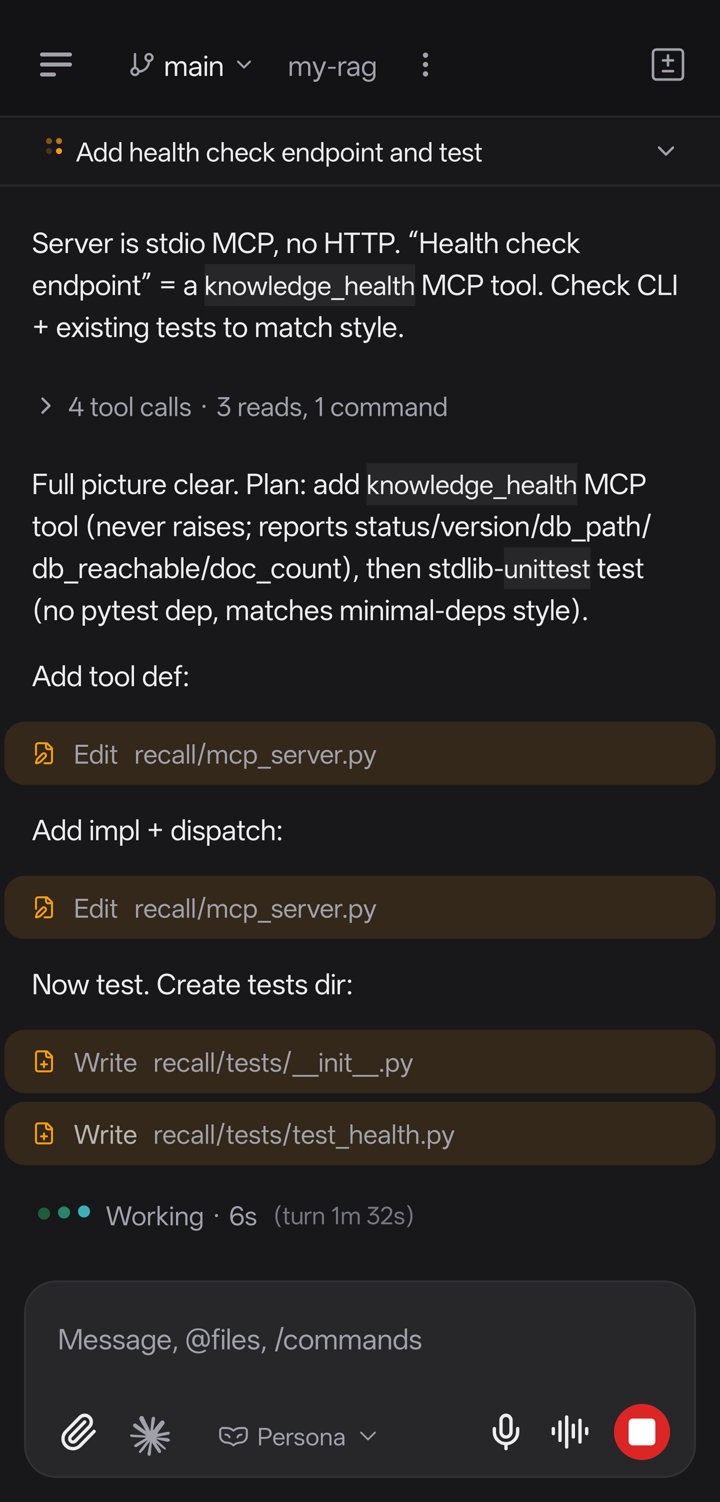
Once a session is paired, steering it from your phone is concrete. You see the live transcript — every tool call the agent makes as it makes them — so you’re never guessing what it’s doing. You can type a message mid-run to redirect it the instant it starts drifting, instead of waiting for it to finish down a wrong path. And when it reaches an action-required prompt — the “allow this command?” gate that would otherwise freeze the run until you’re back at your desk — the request surfaces on your phone and you approve or reject it in seconds. The agent never leaves your machine; your phone is only the remote.
FAQ
How do I enable Claude Code Remote Control?
From inside a running session, type /rc. Or start Claude Code with it already on: claude --remote-control (short form claude --rc). Claude Code shows a QR code and a link — scan it with your phone or open it in the Claude mobile app or at claude.ai/code, and the same local session appears on your phone.
Why does Claude Code Remote Control fail to connect? The usual causes are: your phone is signed into a different Claude account than your machine (it needs account login, not an API key); your organization has disabled it by policy; the local Claude Code process exited or your machine slept, so the session it mirrored is gone; or a firewall or VPN is blocking the pairing service. Match the account, confirm your org allows it, and keep the local session alive.
Does Remote Control work with an API key? No. Remote Control pairs through the Claude mobile app and requires a Claude.ai subscription and account login — API-key authentication isn’t supported. If you drive Claude Code with an API key, you’ll need a different control surface, such as SeaWork.
Is my code uploaded to the cloud when I use Remote Control? No. The agent keeps running on the machine where you started it, with your files and environment; your phone is just a window into that local session. Nothing is copied to a hosted sandbox.
Can Remote Control run Claude Code and Codex together? No. Remote Control is built around Claude Code sessions only. If you want one app that controls Claude Code, Codex, and Grok Build side by side — and runs several agents in parallel — that’s what SeaWork does; see how to use Claude Code from your phone and Grok 4.5 from your phone for the full survey.
What happens to a Remote Control session if my laptop goes to sleep? Because it’s a view into a live local process, a short sleep or network blip usually reconnects on its own. But if the machine sleeps long enough that Claude Code is killed, or the process otherwise exits, the session ends — there’s nothing left on your machine for the phone to attach to.
Where to start
If you’re already inside the Claude ecosystem and want to steer a single session from your phone, enable Remote Control with /rc and pair through the Claude app — it’s the fastest first-party route.
If you want to control Claude Code and Codex from one app, run several agents in parallel, and keep the whole thing on infrastructure you control, that’s the corner SeaWork was built for.
SeaWork is free. Download SeaWork, read more about Claude Code on SeaWork, or see how to use Claude Code from your phone for the wider survey of options. You can also browse all AI models available in SeaWork if you want to run Claude Code and Codex against more than one model.